Showing posts with label focus. Show all posts

Wednesday, 30 March 2016

A Childhood Highlight


As many of you, I have a lot of childhood memories that make me smile.  Some of them exist in some form today, but very few are almost exactly like they were when we were growing up.  One of my favorite things while growing up was sitting in a doctor's office and looking through the Highlights Magazine.  It seemed to distract me from why I was in that doctor's office.  One of my absolute favorite parts of the magazine was the Hidden Pictures page.  I always felt like I had hit the jackpot when I got to look at it before someone else had circled all the hidden objects.

Fast forward a bunch of years and I am a grownup (for the most part) and I am asked by one of my goddaughters to support her magazine drive.  The first thing I ordered was the Highlights Magazine and have been getting it ever since for my daughter.  Quinn, who just turned 6, loves it and especially loves the Hidden Pictures page.  So a few weeks ago, when someone reached out to me and asked me to take a look at the new Hidden Pictures app, I jumped on it.  I am always looking for new apps, especially ones that are more appropriate for the older kids and this app definitely fits that description.  While they say that it's ideal for children ages 6-8, I think that it can be used with younger children who have strong visual skills, especially if an adult is playing it with them.


So far, I am a big fan of the Hidden Pictures app.  More importantly, the kids are really enjoying it. The pictures are colorful, bold and and great at encouraging conversation (for my speech therapy friends).  It's a great app to work on a variety of occupational therapy skills without the kids feeling like they are "working".  It's more of a game to find all the different objects hidden throughout the pictures and at the same time, the kids are working on improving visual skills (visual motor, visual perceptual and visual tracking).  If you want to try and work on graphomotor skills, you can have the kids use a stylus (I've been using the Cosmonaut lately and love it) when using the app.  You can also have the kids write out the objects on a piece of paper as they find them to work on improving their handwriting skills.  One more thing I like to do is after the kids complete a puzzle on the iPad, I have them do another one in this great Hidden Pictures puzzle book that I have.  There are a bunch of these workbooks out there but I like this one because they have a bunch of black and white pictures that you have to take a handful of stickers and put them on top of the object when they find them.  This adds a greater challenge for those kids who are doing really well with the app.

Unlike the older version of the app, the updated one acts more like a subscription plan.  You sign up and each month a new set of puzzle packs are available.  When you first download the app, there are already 60+ puzzles!  You unlock puzzles as you complete others and there are even special items in the puzzles that need to be collected.  One of the things I like is how there are different modes to choose from so you increase or decrease the level of difficulty/challenge for each kid you work with.  The three modes of play to choose from are:
Free Play-find the hidden objects in whichever order and in however long it takes you
Timed-find all the hidden objects before the timer runs out
Directed-you find the hidden objects in a the order in which they are listed

Oftentimes, parents ask me for app recommendations that would be good for the whole family.  If you are looking for an app that would be good to facilitate social skills and collaboration with a sibling or a friend, this is a great one.  While it can be played  individually, it's also perfect for working as a team to find all the hidden objects.  The kids can take turns finding something or you can have them find one and then they have to give a hint to their friend in order to find the object that they found.  This is great for working on improving language and organizational skills for those kids you know who struggle with these things.

As I have been getting to know the app, I have to admit that I have been sucked into playing  it all by myself for long periods of time.  It brings me back to my childhood in the best possible way.  It's been fun to play this at work and at home and makes me happy that something this simple still brings hours of entertainment to kids today.  If you are on the lookout for a new app for your little ones, I highly recommend Hidden Pictures.  It's not only something that will help strengthen your child's visual skills, it's an app that you won't mind playing with your children.  If you have any questions or want to know more about the Hidden Pictures app, I am always a click away and love hearing from you all!

Friday, 4 March 2016

Let's Play Princess Dress-up


Almost two years, I wrote a post about the Disney Magiclip Dolls that had become a favorite of mine at home and at work.  All this time later, they are still a huge hit amongst the kids I work with and my almost 6 year old daughter.  I'm happy to report that they have been used hundreds and hundreds of times (literally) and have stood up to the beating they have gotten.

A few weeks ago, while trying to kill some time between clients, I stopped into a little toy store in the city and discovered a new line of Disney Princess dolls by Hasbro that grabbed my attention.  They looked a lot like the Magiclip Dolls mentioned above, but as an OT, I noticed that there was a bit more to them that would help improve fine motor and manipulation skills.  These Disney Princess Little Kingdom dolls and accessories have become a favorite of my almost 6 year old daughter.  I'm sure I've mentioned it before here, while my daughter doesn't receive therapy, she does have some weakness in her hands and has a terrible pencil grip so I am always on the lookout for toys that will help her in that area. Since she adores all things princesses, I knew that these dolls would be perfect at hiding the fact that we were working on something that she doesn't like to work on with me.  These princesses are easy to play with and all the outfits are interchangeable amongst the dolls.  The skirts and the bottom of dresses kind of slip on and off and the tops get pushed into a little hole on their chests.

You can buy a big set of the dolls or get them individually.  Some of the sets come with pets or other kinds of things (Anna has a bike that my daughter loves!).  Additionally, you can buy castles or some kind of home for them which is great for working on play and language skills.  Each of the dolls are only 3" tall meaning they don't take up a lot of room!  Excellent news for parents and therapists on the go.  As already mentioned, the outfits and accessories for each of the dolls are interchangeable so each time kids play with them, they can make different outfits.  My daughter has loved swapping the outfits  or having them wear just part of the dress and making it into a skirt instead.  Once you get the hang of it, it becomes quite simple to remove and replace all the different parts of the outfits. My favorite part of the dolls is the itty bitty accessories that come with each of the sets that you can use to decorate the outfits.  This is the part that is great for working on improving fine motor and manipulation skills.  Remind kids to use their "pinchers" when picking up the small pieces and pushing them into place!

In addition to working on fine motor skills, the Disney Princess Little Kingdom work on improving bilateral coordination, eye-hand coordination, motor planning and executive functioning skills such as focus, attention and organizational skills.  The best part is that they are reasonably priced, especially when you think about the fact that you can use all the outfits and accessories with any doll.  I found a really good selection of them at State News on the Upper East Side of Manhattan but have also seen them at other local toy stores (I always like to support the mom and pop toy stores before going to Target or Amazon).

If you are on the lookout for an affordable, fun and portable toy (think restaurants, car/airplane rides, etc.), Disney Princess Little Kingdom dolls are the perfect thing.  If you have any questions, be sure to email me...I am only a click away and love hearing from you all!


Monday, 15 February 2016

It's Okay to Play With This Food!


It's been a while since I found a new game that I felt worth sharing.  To be honest, when I find something, it sticks around for a while.  For example, Tumbling Monkeys and Wok N' Roll have been part of my work routine for as long as I can remember.  When I read about how cold it was going to be this past weekend and that I would be entertaining not only my daughter but also another friend of hers, I decided it was time to add some new games to my daughter's collection. I went into my local toy store, Little Things, in Park Slope and could have gone a little crazy.  I was drawn to many of the educational games but knew that it wouldn't be well received by my daughter who is officially on winter break.  Instead, I went with a game that help work on improving her fine motor skills, particularly something that might help promote a better grip.  Yeti In My Spaghetti, by Play Monster (formerly known as Patch), was a HUGE hit with both my daughter and her friend.

I like when games are simple and easy for kids to play...that means that grownups don't have to struggle when reading the directions in order to figure out how to explain the game to said kids! How many of you have purchased a game like that and then never played it because you just couldn't figure it out??  Nothing frustrates me more!  Even better, there are no batteries required which means that this is a quiet game free of noise and lights!  The object of Yeti In My Spaghetti is quite simple:  place the 30 pieces of spaghetti over the bowl in a criss cross pattern and then place the Yeti on top of your pile.  Choose who is going to go first and begin pulling the spaghetti out from under the Yeti without letting him fall into the bowl.  You must be mindful, look at what you are doing and take your time when pulling the spaghetti pieces out because if the Yeti falls while you are pulling it out, the game is over.

Besides the fact that this game is fun, it is great for working on a ton of skills for your little friends (I can't help but let my occupational therapy brain go there).  Ideal for kids starting at age 4 (or a super patient 3 year old) and perfect for working on:
*facilitating a pincer grasp as you pull the spaghetti pieces out
*improving eye-hand coordination, visual motor and visual perceptual skills as you scan and plan what piece is best to take out from under the Yeti
*improve executive functioning skills, especially focus and attention and organizational skills
*improving social skills such as turn taking, good sportsmanship and teamwork (you can play in teams)

If you begin to get bored with the game, you can come up with some alternative ways to play it.  For example, add a dice to the game and have kids roll it and then take how ever many pieces of spaghetti that they roll.  If you really want to work on improving fine motor skills, have the kids remove the spaghetti pieces using a strawberry huller.  Do you have any other ways to vary how to play this game?

If you have kids or work with kids, I highly recommend this game.  Reasonably priced, easy to carry around and most importantly, fun to play.  Great for parents or therapists, even those that travel from home to home, since it is lightweight and doesn't require batteries.

If any of you have any great games that you have recently discovered or ones that are long time favorites, please share them with me and my my readers.  I am always a click away and love hearing from you all!

Thursday, 31 December 2015

Make Your Kids Appy!

Typically, I include a section in my Holiday Gift Guide that talks about great apps, but decided to keep that off this year.  However, I have been asked by many of the families what they can put on an iPad.  In today's world where technology appears to be taking over things, I think it's important that if we do introduce our kids to an iPad that we are at least mindful about what our kids are playing.  It's easy to just go to the app store and pick out the free ones but you would be surprised about some of the content on those apps.  Sometimes it's totally worth it to pay for a good app.  I also find that parents are more likely to use an iPad during the winter months (I mean, if winter ever arrives) when they find themselves stuck inside more.  They may spend lots of time playing with their toys and being outside, but need something more sometimes.

Speaking from personal experience, sifting through the countless number of kids apps on iTunes can end up being a full time job.  It can also get incredibly frustrating because many of the apps are no good and you end up wasting money and using space on your iPad that you could use for better things.  I have broken down my app suggestions for you into categories to make it easier to find what you are looking for.

Alphabet/Reading: of course you can use flashcards to teach children letters and numbers.  However, sometimes, especially for the kids I work with, they need something really motivating to get them to focus and attend to learning. Trying to figure out which ones should be on your iPad can get frustrating because there are just so many of them.  Here are a few of my favorite kid-tested alphabet apps.  
Faces iMake ABC-this alphabet app has two different games.  The first one, Learn ABC shows you a picture of something that starts with that letter and then breaks into a bunch of pieces.  The children then have to drag all the objects back into place like a puzzle to put the picture back together. The second game, Find ABC, has a letter and then a dozen different objects.  Your child's job is to collect the 5 objects that begin with that letter and place them in a grid. This hands on ABC game will be sure to get your kids excited about learning their letters.  
ABC Gurus-created for early learners/preschoolers, this ABC game is fun and creative and helps them not only learn their letters, but the sounds each of them make.  Kids love that they can pick a letter and then personalize it by coloring it and adding faces to it.  Once they are done personalizing their letter, they can then interact with it.  Kids don't only work on being able to identify their letters, they are working on learning the sounds of them and working on their creativity skills.  
Avokiddo ABC Ride-I am a giant fan of all of the Avokiddo apps.  More importantly, the kids I work with love them and ask to use them over and over again.  In this app, kids choose a character (Beck or Bo) and take them on an alphabet biking adventure.  Kids get to learn about the letters of the alphabet (you can choose to go in order or have the letter show up randomly) through fun mini-games.  For each letter of the alphabet, there is a fun activity/work associated with it.  Once they finish the game (catch the falling apricots in a basket, find the H hidden under a hat, etc.), they have to drag the letters of word back into place.   There are 26 different interactive scenes where kids get to practice spelling words depending on the letter of the alphabet.
Endless Alphabet-this app by Originator Kids might have been the one that convinced me that the use of an iPad during therapy might be far more beneficial than I had ever imagined.  In this truly delightful and interactive educationally based app, kids will their letters and begin to learn how to spell.  I love that my daughter has learned a bunch of new words and has been able to generalize them in the real world (she is a big fan of belch).  For each word (and there are a bunch of them), kids get to watch a short little video explaining the words after they drag all the letters back into place.  I like to challenge my kids to place the letters in their spot in order, but that can be too difficult for some of the younger kids I work with.  Just recently, Originator Kids has launched a comprehensive app called Endless Learning Academy.  I haven't had a chance to play with it much, but plan on it being used a ton in 2016.  Kids will learn letters, numbers, shapes, spelling and even Spanish while hanging out with their favorite loveable monsters. This is more of a subscription plan kind of app, but based on what I have seen so far, it is totally worth it.


Handwriting/Drawing: finding good handwriting and drawing apps is really important to me since it is one of the things I work on the most with the kids I work with.  I don't ever just use an iPad/tablet when working on handwriting but I do use it as a motivator to practice letters and numbers.  I always have a Boogie Board or a paper right next to me when using the handwriting apps so as soon as the kids finish up practicing the letter on the iPad, they then have to write it again.
LetterSchool-this is by far my favorite and most used/suggested handwriting app for the last several years.  Children can work on learning how to write upper and lowercase letters and numbers.  There are two levels to move through and for each letter or number, there is a 3-step process of practicing them.  First you learn where a letter starts and watch it being made.  Second, you have to drag the lines to complete the letter.  Lastly, children have to write the letter.  I like that this isn't solely a tracing app and the kids actually have an opportunity to practice their letters without lines being provided.  
Writing Wizard-this Montessori based app is another one of my go-to handwriting apps.  It not only allows you to practice letters and numbers, but also has shapes and pictures for you to practice.  One of the things I like about this graphomotor based app is that it is very colorful and engaging for the kids.  You can also customize it based on the child you are working with and his/her particular goals. Another nice thing about this app is that you can practice writing words that you personally add to the word list.  While grownups will like the learning aspect of the game, the kids will have fun learning since there are different ways to interact with the letters/shapes/numbers once you have successfully completed tracing them.   Similar to LetterSchool, there are options for the children to practice writing the letters, numbers, etc. without tracing.  
Little Writers-this is a great graphomotor app for younger kids. Like the previous two apps, this one is not just a tracing app; as the child progresses in their skills, you can increase the level of difficulty and have the dots disappear.  In the full version of the app, kids can work on learning how to write both upper and lower case letters, numbers, shapes, etc..  You can customize the whole app making it perfect for your child by recording your own voice, adding your own words to the list and adding pictures of people and objects!  Kids love the cute graphics and how easy the app is to use.  I love that it is so motivating and engaging for the kids making learning how to write a non-stressful and fun activity.  
Stella and Sam Draw Along-Stella and Sam are a brother and sister and their drawing app is a favorite of so many of the kids I work with.  It's an engaging drawing app that gets kids excited to draw.  All they have to do is a pick a shape, decorate and watch it come to life.  Kids can save their images which is always a big deal for kids.  I love that while working on drawing, kids are also working on increasing their creativity and imagination skills.

Visual Perceptual Skills: visual skills can be broken down into a few categories:  visual perception, visual motor and visual attention.  All of the apps below work on all of these plus so much more.  Kids who struggle with visual skills may have a more difficult time with putting together puzzles, learning how to write and draw and complete patterns and sequences.  When children struggle with things, they tend to avoid them all together.  The iPad is a perfect tool to work on building confidence and self-esteem in this area of development.  Once children realize that they can be successful with something on the iPad, it is easier to generalize that skill to an hands-on activity.  In my sessions, I try to follow-up the iPad activity with a more hands-on game or puzzle and recommend that parents do the same thing.  There are a lot of great apps out there, but here are the ones that are the most popular with my kids now.
Winky Think Logic Puzzles-this is a great app to work on improving problem solving and motor skills.  At the same time, kids are having fun and being challenged to use their brain to solve a variety of mind puzzles.  It's a fast moving game that works on improving visual motor and perceptual skills, executive functioning skills and can be played individually or with a friend.  There are three different levels of play, making this good for a wide range of ages.
Lumio Shape Arts-I remember playing with those plastic and wooden tangram sets growing up and having so much fun.  When I started in private practice ages ago, I tried to find the perfect tangram set to use with my kids.  Fast forward to the introduction of the iPad and then my search for the perfect tangram app began.  Shape Arts is the closest to perfect tangrams app that I have found (and my wallet will let you know that I have tried too many).  Great for working on improving eye-hand coordination, visual motor and visual perceptual skills, executive functioning skills and focus/attentional skills.
Bugmazing-in this game by LittleBit Studios, kids can work on developing crucial visual motor, visual perceptual and executive functioning skills.  Choose a level of play and kids will be able to travel through a series of mazes while learning patterns, colors, letters of the alphabet and so much more.  There are over 20 different challenges for the kids to work their way through.  They love that they can collect coins and jewels along the way.  I love that they can work on important visual skills while having loads of fun!
Toonia Differences-there was a time in my life when I was absolutely addicted to that Spot the Difference game that was all the rage when iPhones first came out.  I could spend hours on it trying to beat my best score.  When I discovered the Toonia Difference game, I was psyched that someone had created a version suitable for kids.  The game is simple to play:  compare two pictures and try and spot the differences between them as fast as you can.  The pictures are cute and can encourage conversation at the same time they are working on improving a variety of visual and executive functioning skills.  

For Little Kids (2-5 years):
Lazoo Zoo-this is a super cute interactive app that allows kids to interact with all kinds of different animals at the zoo.  Their job is to feed the animals and after they do, they will watch the animals transform and change depending on who they are and what they eat.  Great for learning about colors, foods, animals, etc.. Also great for working on improving eye-hand coordination and language skills. 
Sago Mini Pet Cafe-this is one of my favorite apps for my younger kids.  Actually, you can't really go wrong with any of the Sago Mini apps available right now.  The funny thing is that some of my older kids still love to play this game even though it's too young for them.  Through 3 different games, kids will learn about colors, numbers and other educational concepts.  Also great for working on improving visual motor and perceptual skills, eye-hand coordination and focus and attentional skills.  
Look and Find Elmo on Sesame Street-my little girl never got into Elmo or Sesame Street like so many of the kids I work with, but I think that makes her the exception.  It's amazing to see how excited so many of the kids I work with get over Elmo and all his buddies.  In this app, kids can entertain themselves and work on improving eye-hand coordination, visual motor and visual perceptual skills while looking for different items hidden throughout 6 different Sesame Street scenes.  Kids love it because Elmo will keep popping up cheering them on while they are looking for the different items.
Bugs and Bubbles/Bugs and Buttons/Bugs and Buttons 2-I love all of the apps by Little Bit Studios and while I put this in my younger kids section, they are all appropriate and loved by my bigger kids as well.  These apps are still as entertaining and as motivating as they were when I downloaded them years ago.  They are still one of my  most recommended apps for parents to add to their app collection.  First of all, each app comes with 18 different games that teach your child a variety of things:  colors, shapes, matching, eye-hand coordination and a million other things.  Second of all, there is such a variety in the games that your child can play it over and over again without getting bored.
Pepi Doctor-still one of the most recommended apps at work (and at home), even after years of play.  I think kids connect with the characters in the game and love helping them feel better.  They start by choosing one of the 3 characters.  Once they choose their character, they then get to be the doctor in 5 different games.  Whether it be cleaning their teeth or putting back together a broken bone, kids are motivated and engaged during this game.  I find it's a great game not only for improving visual skills, but to encourage language skills and social skills.  It's a great game for kids to play together to learn how to take turns, compromise on what games to play and to talk about the game.

For Bigger Kids (5 and older): so many of the bigger kids I work with are walking a fine line of being too big for "baby" games but too young for the older kid games.  I try and stay away from things like Candy Crush, Minecraft or other games that I know that they can play at home.  It's been fun to discover some of the games below and see how engaged and excited the kids get.  Little do they know that while they are having fun, they are developing critical skills that will help them become better students.  Here are a few of my favorites for the bigger kids.  
Thinkrolls/Thinkrolls 2-these games have been a big hit with many of the older kids on my caseload.  There are two versions of this game and each of them are totally worth spending the money on because they will keep your kids occupied and thinking for a very long time.  There are several puzzles to play that works on improving problem solving, memory and spatial organizational skills. Kids can learn about all about science and physics while exploring the different levels of both Thinkrolls and Thinkrolls 2. 
Toca Blocks-in this app by Toca Blocks, children are able to create and explore worlds that they build.  Using different kinds of blocks, children build an explorable environment filled with different characters and adventures.  Great for working on improving focus and attention, improves creativity and problem solving and can be used in a small group of kids to encourage social skills, teamwork, cooperative play and stimulate conversation.
Fruit Ninja-some of my older kids shy away from any apps that look as though they are made for "babies" so I have tried to put a few games on my iPad that are more mainstream but at the same time will work on important therapeutic skills.  Fruit Ninja is simple:  slice as many fruits as you can in a given amount of time or before you hit a bomb/drop too many pieces of fruits.  This game is great for working on improving visual attention, focus and attention, eye-hand coordination and a ton of other visual skills.  For my kids who are working on grasping, I have them use a stylus while they play.  I also like to throw in my own challenges to work on following directions.  For example, I will tell them to only slice red fruits or ones that you have to peel before eating.  Makes them not get too sucked into the game (although it is a truly addicting and fun game).
Whac A Mole-I've been a fan of the board game Whac A Mole for years.  This is definitely an app for older and more patient kids and a wonderful way to build up their frustration tolerance.  It's not an easy app and while I wish there was a way to slow it down at times, I like the challenge of it.  With over 60 levels to play, your kids will have fun while also working on improving focus/attention, eye-hand coordination, visual scanning and several other skills.

Apps are only as good as the design companies who make them.  If you look through my iPad, you will notice that I have several games from the same companies.  I am constantly looking at the following websites to see what amazingness they have in store for us app-addicted people:
Toca Boca
Toonia
Avokiddo
Sago Sago
PepiPlay
Originator Kids
Lumia Kids
Tiggly
Osmo
Duckie Deck

Here are a few suggestions to make using an iPad even more therapeutic for your kids at home.  
*whenever possible, use a stylus instead of their fingers.  This is a great way to work on improving your child's grip on a writing instrument and improve eye-hand coordination.  There are a lot of different stylus' to choose from but my favorite are the iCreate Crayon, the Kikkerland Mini Stylus Pen or the Cosmonaut stylus.  They are all a bit smaller than a lot of the other stylus' you might see out there encouraging a more appropriate grasp when holding it.  Additionally, both the crayon and Cosmonaut stylus are a bit thicker and have a rubbery grip making it a bit easier to hold onto for those little hands.  
*work on a raised surface when possible.  In order to do this, you can place the iPad on an easel or get some kind of stand to put it on when they are playing with it and have them sit on a chair or a therapy ball.  Make sure that the iPad is at eye level.  First of all, this is great for working on improving shoulder stability and strength.  Without proper stability and strength, developing age-appropriate fine motor skills becomes much more difficult.  Secondly, working on a raised surface works on building wrist control and strength which often times leads to a more proper grasp when holding onto writing instruments.
*when at the gym, I have kids work on the iPad while lying over a bolster or when on the net swing.  This allows us to work on building their upper body strength, shoulder stability, wrist control and head/neck control at the same time.  I have found that when kids are having fun playing an app, they are distracted about how hard they are working on this swing and last for much longer periods of time 
*when possible, have your child or children work with a sibling or a peer on the iPad.  This encourages socialization and conversation which is often the main complaint I get about children using iPads and other forms of technology.  If used the correct way and if playing the right apps, it can actually be used to facilitate conversation amongst children, work on turn taking, compromise and collaborative play.

While many of us make New Year's resolutions to spend less time looking at the screen, it's important to keep in mind how beneficial and motivating it can be for kids who have a hard time with learning.  Whether it be because they have a hard time learning or interacting with his/her peers, when used correctly and in moderation, the iPad can end up helping children become more confident and willing to take risks.  Making sure that I have a hands on activity after playing the iPad is a huge thing for me.  For example, if you have a child who is totally resistant to drawing or writing letters, start with something like LetterSchool and then have a Boogie Board writing tablet close by so they can immediately practice their letters.  Keep learning fun, motivating and offer many opportunities for success.

I'd love to hear from you guys about your favorite apps.  Do you have any winners that I should be using in this new year?  I love to start the year off fresh and exciting for not only the kids, but for me.  I find an updated selection of apps is good for everyone and keeps us focused and keeps therapy fun.  Be sure to send me an email with your suggestions.  I'm always a click away and love hearing from you all!

Wishing you all a very "appy" 2016!  


Friday, 23 October 2015

The Monster Mash!

Halloween is just around the corner and it's really beginning to feel a lot like it in the air.  All around New York City, decorations are up (I'm ignoring the fact that Christmas decorations are also popping up everywhere as well), kids are talking about trick-or-treating and their costumes and I'm going a little crazy with arts and crafts projects with my kids at work.  However, some of the kids I work with aren't into crafts but still want to get into the Halloween Spirit.

For those of you who read my blog, you will know that I am a big fan of using the iPad during my sessions.  When used in conjunction  with other therapeutic activities, it can be a highly motivating and educational tool.

Go Away, Big Green Monster-I've been a big fan of the Ed Emberley book of the same title for years.  I love the way the kids can interact with the story and how it helps some of the younger kids I work with learn about body parts.  The app brings the book to life and allows the kids to add and remove all the parts of the monster. Once he is put together, they can poke at him and see how this scary looking monster is nothing to be scared about.  I like that the kids can choose to read along with either a 4-year old narrator or hear the book be read by Ed Emberley himself. 
I like that you can add a hands on activity once you have finished playing with this app.  You can have all the pieces cut out of construction paper so you can have the kids make their very own Big Green Monster.  If you are working on teaching kids how to draw people, this can be a fun activity to reinforce where all the parts of the face go.
Sago, Sago Mini Monsters-Sago Sago has been a long time favorite of mine and children love all of the apps that they create. Each of these great apps are colorful and engaging and stimulate language, fine motor and visual motor/perceptual skills.  In Sago Min Monsters, children are able to create their own colorful monsters.  They can add details to make their monster their very own.  When they are all done creating them, they can interact with the monsters with pain, food and decorations. Kids think it's hilarious that they can feed the monsters and if they don't like the food, they will spit it out at them.  They can have them play with toys and instruments.  All of the interactive components make this a great app for working on following directions and language development.
You can add a fine-motor/craft component to this by cutting out similar monster parts and having the kids create a paper monster that they get to take home.
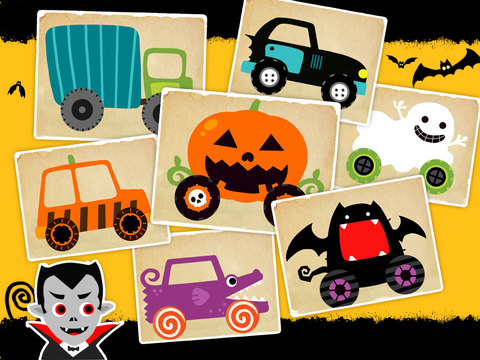
Labo Halloween Car-the kids I work with love the racing games so when I saw the Halloween Car app by Labo Lado, I had to have it.  I've used it with a few of the kids I work with and they really are loving it.  They get to choose from 12 different cars, several of them being Halloween themed (think bat, pumpkin and ghost).  They get to color it any way they want, add wheels and then add details and a character to make their car their very own.  Once they have completed designing it, they get to take it on a ride through different spooky racing routes.  
This app is great for working on improving graphomotor skills, encouraging creativity and visual motor/perceptual skills.  Also great for working on executive functioning skills, such as focus and attention and organizational skills.   
Stella and Sam Halloween Band-I've been a longtime fan of all things Stella and Sam by Zinc Roe Design since they are so interactive and work on so many occupational therapy goals.  If you haven't checked out their other apps, do yourself a favor and do it!  In this Halloween themed app, you get to join Stella and Sam in their band!  There are 6 different instruments to play.  You can change the sounds by moving the band members side to side or up and down.  If you look carefully, you will see bats, spiders and other characters floating around that you can interact with.  Great for preschoolers or young school-age children.  You can work on color recognition by having the kids hit the different colors when you ask them to.  As they get more familiar and comfortable with their colors, you can make this more complex by having them follow sequences.  For some kids, you might want to make them remember the order just by telling them and for others you may want to put out a visual for them to follow.  Kids will creating their own music while learning at the same time.  
Spooky Letters-I have a ton of great handwriting apps, but thought it would be fun to spice things up with this Halloween themed writing app by MadeByEducators.  In this app, children can practice writing upper and lower case letters, cursive letters, shapes/pictures and words.  What I really love about this particular handwriting app is that there is a big focus on phonics.  After practicing writing each letter, the kids then have to put letters in order for a word that starts with that letter or put together a simple puzzle that reveals what monster is hiding in the box.  For example, after you write the letter "K", a jumbled up word (key) comes up and they have to put them in order.  During the whole thing, the kids are hearing the letters being sounded out which is great for those who are struggling with learning how to read.
**one thing I noticed is that some of the letters that we typically start at the top (M and N for example), actually start at the bottom.  Could be confusing for some kids but there are a lot more positive things about this app that make it a good one to add to your handwriting app choices.

If you are concerned about using an iPad during therapy, keep in mind that there are a ton of ways to make it more therapeutic.  I also can't Here are a few examples of things you can do to make using the iPad more meaningful, whether it be at home or during your therapy sessions:
*use a stylus-many of the apps can be done using a stylus.  So even though the kids are absorbed in the app, they are working on developing a proper grasp.
*many of the kids I work with need to work on increasing their overall body strength, particularly upper body and neck/head.  Have them go on the net swing and play the apps.  
*if you work with groups of kids, almost any of these apps can be good for a small group setting.  They will have to compromise about colors for their cars, what to feed the monster, take turns playing instruments, etc.. There are a lot of great social opportunities available when using the iPad in a therapeutic setting. 

I would love to hear if any of you have some great Halloween or fall-themed apps that I should check out.  I like to take advantage of holidays and mix things up during my sessions.  Between the great arts and crafts activities, baking activities and the iPad apps, I have been rejuvenated the last couple of weeks during my sessions.  The kids are also having a great time and excited for new things at the gym.  So if you have any fun things to suggest to me or my readers, please share them!  I am always a click away and love hearing from you all!


Wednesday, 2 September 2015

What's On My iPad

I had grand plans this summer to do wonderful things with my blog and write at least weekly...maybe even more.  Well, the beach and my kid called and I hardly wrote at all.  Now I am playing catch up because this time next week, I'll be in that back to school panic mode and worry I won't have time to write.

I spend a lot of my summer trying to figure out ways to get things new and fresh for the new school year.  While there are a ton of apps on my iPad that I've had for years and that the kids never tire of, I like to add new ones.  In this post, I will share the apps that are the most popular with the kids in my life right now.  Some may have been written about before and others will be new.  The common factor is that they are fun, motivating and worth every penny (for those that you have to purchase).

I know that using an iPad in therapy is not for everyone and I certainly don't use as my sole means of
teaching a child a skill.  The truth is that using an iPad and finding good apps can be really motivating, especially to children who are struggling with skills.  I have found that an iPad is exciting for them, particularly for those children who don't have access to one at home.  Another great thing about it is that it is easily used in conjunction with other activities that address similar goals.  For example, how many of you have a kid or work with a kid who will avoid handwriting at all costs?  I have had so much more success with getting a kid to pick up a pencil and copy a shape or write a letter or number after they have practiced it on the iPad.  There are also a lot of ways to make using an iPad more therapeutic:
*use a stylus whenever you can while using the iPad, especially if you have a child who needs to work on improving their grip on writing instruments.  My favorites are the the iCreate Crayon stylus, the Kikkerland Retro Stylus and the Paper Mate 2 in 1 Stylus pen.
*whenever possible, I have my kids lie prone on the net swing or over a bolster when using the iPad.  This works on improving upper body strength but they are often so focused on what's on the screen that they aren't focusing on being or getting tired.
*when appropriate, try and have kids work together to play the iPad.  People don't think something like an iPad can encourage social skills, but I have found that it is a wonderful tool for that.  Turn taking, problem solving for puzzle games and increasing pragmatic language are all things that can be worked on using an iPad
*bring parents in and show them the apps you are using with their child so they can do them with them at home.  Parents are always asking me for things that they can do that isn't really work.  I know from trying to "work" with my own child, that if it looks like work to her, she won't do it for me.  Making sure it is fun goes a long way and parents feel good that they are having quality time with their children while working on important skills.

Here are my iPad choices for right now.  Each of them has been kid tested and therapist approved!  

Star Gurus-I'm always looking for connect-the-dot like apps but most of them are boring and the kids tire of them quickly.  Additionally, you get a couple of puzzles and then have to keep paying extra money in order to add more to your collection.  A couple of weeks ago, I stumbled upon Star Gurus by Colto, a wonderful a creative studio dedicated to creating educational apps that will "make your kids smile", and was so excited by how captivating and motivating they were.  In addition to teaching your kids to count, it works on improving eye-hand coordination, visual tracking and several other occupational therapy skills.  One of the things I like about this particular connect-the-dot app is that you also have the option of counting by 2s or 10s which makes this more appropriate for some of the older kids on your caseload.  I have also found that the kids I work with are super motivated about the final product of connecting the dots....once all the stars are connected, they form a constellation.  Very motivating and exciting for kids, especially those who are interested in stars!

Shape Gurus-another great app by Colto, Shape Gurus is a fun and motivating way to learn about shapes, colors and early geometry skills (I wish I  had something like this for myself when I was growing up!).  This app is appropriate for children as young as 2 years old, but the older preschoolers and young school age kids on my caseload are loving it.  Shape Gurus stimulates creative problem solving, sequencing, visual motor and visual perceptual skills and many more.  I like how each puzzle moves into the next one allowing the parent or therapist to work on building language skills at the same time.  At the same time, it can work on increasing attention span.  Since each puzzle moves into the next one, the kids are engaged and not wanting to stop playing the game.  Some of my kids with the shortest of attention spans easily spent the 15 minutes it took to complete the whole game without any encouragement from me.   

Lazoo Art Box-I wrote about this one in great detail here a few weeks ago, but didn't want to leave it off this list of my favorites.  Lazoo has been a long time favorite of mine and I discovered their apps because of the amazing activity books that they have developed over the years.  They have taken the magic and uniqueness of their books and put them into a truly dynamic and motivating app that encourages, motivates and gets kids excited about art.  The best part for me is that while there are clear ideas and suggestions about what to do (i.e. draw something coming out of an elephant's trunk, put swirly wool on a lamb or color in an airplane before it takes flight), they leave plenty of room for a child to think outside of the box and be as creative as they want to.  Lazoo Art Box is a great way to work on improving graphomotor skills such as 

LetterSchool-as for as handwriting apps go, LetterSchool continues to be my go to and the first one I recommend to parents who are looking for a fun way to practice letters with their children.  Whether you want to begin working on teaching children how to write their letters or if you want to review what they already know, this is the best app out there.  It comes with three options:  uppercase, lowercase and numbers.  There are two levels of play for lots of practice.  For each letter and number, you work through 3 games (tap, trace and write) in order to earn stars.  Once you have completed both the silver and gold levels of play, you can then unlock the opportunity to do free-form writing.   Don't forget to use your stylus when using this app!

Winky Think-Spinlight Studio is a series of logic puzzles that will help your kids develop problem solving and fine motor skills.  Due to the puzzles getting increasingly more challenging, this app is appropriate for preschoolers and school age children.  To quote my 5 year old daughter, "This started really easy but it's getting more difficult!"  However, it doesn't stop her from doing the harder puzzles and feeling more proud of herself when she gets the puzzles on her own.  I've tested it out a few times and must admit that I ended up getting sucked into it as well!  With each puzzle, kids learn a new tool that will help them solve puzzles that will show up later in the game.  One of the things I like most about this is that there is no timer and the children are given as much time as they need in order to solve each puzzle.  Often times these kind of math and reasoning games are timed and end up causing the kids I work with to get nervous and have increased difficulty in completing it.  Another great app for older kids.

Avokiddo Think Rolls/Think Rolls 2-another one of those apps that I have written about in great detail before but can't be left off this list.  Most of the apps I have are geared towards the preschool or early school age kids.  Finding apps that will keep the attention of the older kids on my caseload is more difficult and when I find one, I am super happy.  You can read all about all of the Avokiddo apps in this post here but Think Rolls and Think Rolls 2 is awesome for the older kids on my caseload.  Kids choose a character and have to move them through a series of obstacles and mazes.  Each chapter introduces a new object with a unique physical property that kids will have to manipulate and experiment with in order to get through each puzzle.  These games are great for working on focus, attentional and problem solving skills.  I sometimes have kids play this game together in order to work on improving social skills.  It's a great app for kids to problem solve and work together to solve the puzzles...especially as it gets more and more challenging.

So, these are the apps that are getting the most screen time on my iPad.  I love that almost all of them are appropriate for a wide range of ages and that they are interesting and challenging enough that parents won't mind playing them with their kids.  As a new school year begins and you might be looking for educational but fun apps for your kids, I recommend any or all of these 6 apps.  I know that we tend to try and decrease the amount of screen time our kids have during the school year, but rest assured that any of these will help with learning and building important skills that will carryover into what they are focusing on in school.

Do you have any great apps you discovered this summer?  Now that my own child is going into school, finding wonderful apps is even more important for me.  Send along any suggestions, questions or thoughts to me.  I am only a click away and love hearing from each and every one of you!

Wednesday, 22 July 2015

Let's Get Cooking!

It's totally crazy to think about how quickly this summer is going.  I don't know about you, but even though we are having a lot of fun and doing lots of things with our own daughter, my husband and I are sometimes trying to figure out what to do with her.  We are getting to that point, especially these last few days, that it's so hot out that we don't even really have the motivation to go outside.  So even though there are several weeks left of summer, it is now it is time to get creative and keep us all from going to stir crazy.

One thing that brings me more joy than pretty much anything is baking.  It is something that connects me to my father and acts as my personal therapy.  As soon was Quinn was old enough, I started having her bake with me.  As a matter of fact, one of my favorite gifts for her was her first apron (thank you Carrie Cook!  Quinn still wears it when baking all these years later).  It started off simple and I would have her pour all the ingredients in for me.  As she got older and could be more involved, I'd let her do more.  The day I let her crack her own eggs was a pretty exciting day for her.  Baking with Quinn has been something that has not only been something we could do together to bond over, but has been a fun way to teach her new things.

Cooking and baking with your kids can be a wonderful activity, especially in air conditioning on these super hot days.  When parents are asking me for things to do over the summer to keep their kids up to speed with their occupational therapy goals, baking is one of the first things I suggest.  Not only is it fun, it can be tremendously therapeutic. Additionally, introducing kids to cooking/baking early on in life makes them more likely to take risks when eating and try new foods.  There are also a lot of ways to sneak in opportunities for learning when baking.  For example, if your child is working on learning their letters and numbers, they can make cookies using alphabet or number cookie cutters. If they need to work on building up strength, you can do it while stirring ingredients.

**before I begin the next half of my post, I am going to admit I am much more of a baker than a cooker.  So going forward, when I say baking, it represents both baking AND cooking***

Some of the therapeutic benefits of baking with your kids are:
Improve Upper Body and Hand Strength-baking is a great way to work on this skill in a fun and sneaky way.  Stirring the ingredients, especially as they start blending all together, can become increasingly difficult and require a lot of strength and endurance.  When baking for your family, I suggest that parents let their kids roll up their sleeves and mix with their hands instead of a spoon or a spatula....this really helps with building up the strength in those small muscles of the hands.
Improve Bilateral Coordination-baking is a great way to work on improving bilateral coordination because there are so many parts of this activity that require the use of two hands.  For example, when pouring the ingredients you need one hand to hold the measuring cup or spoon and the other pours the ingredients.  When mixing the ingredients together, it's essential that you hold the you hold the spoon or spatula with one hand and keep the bowl stable with the other one.  How about cracking an egg?  You need to hold the egg with one hand and keep the cup or bowl still with the other.
Improve Fine Motor Skills-do you have kids who need to work on improving cutting, grasping and other fine motor skills?  Baking is a great way to do that in a really fun way.  Need to work on cutting?  How about getting your kids to cut open the bag of chocolate chips?  If you have a ton of patience and time, you can use a pair of Zoo Sticks to put some of the smaller ingredients in (chocolate chips, pieces of fruit, etc.).  Even the simple task of pulling the paper off the butter is a great fine motor activity.
Improve Visual Motor/Visual Perceptual Skills-baking is a great way to work on improving visual skills.  When you are following a recipe, you have to be able to visually track between the recipe and the ingredients.  You need to be able to pour ingredients into a measuring cup or spoon and be able stop pouring them when they hit the line.
Improve Executive Functioning Skills-what I love about baking is that it is a great activity to work on improving higher level skills for older children.  Baking requires an incredible amount of focus and attention.  It requires one to be able to organize their ingredients, sequence and follow directions.  If you one doesn't (and I have lots of experience here) follow directions and focus carefully, you can end up with a mess of a project.  Baking is a great activity for older kids who need to work on improving their executive functioning skills and the best part is that much of the work can be hidden.
Improve Social Skills-baking is an incredibly social activity. Even though I am an occupational therapist and I tend to see kids on a 1:1 basis, I have also been lucky enough to spend a lot of my time working in social skills groups.  As a matter of fact, in September, I will be working with The Meeting House again as we begin our TMH Juniors group.  One of our program offerings will be a baking/cooking class once per month.  The social benefits of baking are endless and can be easily carried over at home with siblings and friends.  You can work on taking turns (pouring ingredients in), work on compromise and working as a team to complete a final project.  Once a cooking project is finished, there is a tremendous social opportunity to take advantage of.  You can set up a table or a picnic blanket and let the kids have conversations about what is happening in their lives.  If you have kids who have difficulty with conversation, you can throw a pile of conversation cards out in the middle of the table for them to reach out for when there is a lull in conversation.

There are a lot of fun and simple baking and cooking activities that you can do with your children...some that don't even require oven or heat!  Just keep in mind, when cooking with children, you will need patience and extra time.  Kids will ask a lot of questions, make a mess and may even lose their attention part way through your activity.  One thing to do in order to prevent that from happening is set up all the materials before you call your kids in....have your ingredients out, eggs cracked and in a cup, measuring spoons and cups ready, etc..  As children have more success with a cooking activity, you can start to add on responsibilities such as having them take out the ingredients.
Here are a few ideas for you to try with your kids, either at home or at work. I've tried them all and they have been a huge hit!

Zipsicle-I saw these when in Bed, Bath and Beyond a few weeks ago and had to try them.  Who doesn't love a refreshing ice-pop?  How about making your own with your kids?  These little pouches are perfectly designed for making your ice pops.  If you go here, you will find a bunch of tasty and easy recipes you can follow to make your very own ice pops.  The best part, is that you can avoid artificial flavors and colors, which so many of the kids I work with are unable to eat, and add lots of fruits and other healthy ingredients.  
Zoku-this is another fun way to make your own ice pops at home.  I wrote out the Zoku ice pop maker about two years (check out that post here) and since then, they have expanded their line.  They still have their original pop maker, but now have smaller ones that don't take up as much room in your freezer.  They also have molds that are in the shape of fish, people and rockets, which might make your little ones more willing to try a new flavor. You can follow one of their recipes or make something of your own.  
Rainbow Fruit Kabobs-another activity that doesn't require the use of an oven or heat.  I love the idea of fruit kabobs and have actually made these with many of my kids when I was running social skills groups.  This activity is great because it can encourage your child to try new fruits.  It works on building fine motor, visual motor/perceptual and bilateral coordination skills.  For younger children who are just beginning to learn their colors, it's a fun way to reinforce it for them.  It's also nice to work on improving organizational and sequencing skills for older children who are struggling with both of these things.  Lastly, this is a simple enough of an activity that you can do it in small groups and encourage conversation, cooperation and team work.
Alphabet Cookies-I have always found that if you hide the work in learning, kids are more likely to hold onto the information.  I have always had a set of alphabet cookie cutters in my office to use with playdough and the kids really love it.  At home, you can take those same cookie cutters and make cookies instead.  If you are motivated, you can make your dough from scratch but if you want to
make it simple and fast, buy the rolls of sugar or chocolate chip dough at the store....the end product is the same.  There are so many opportunities to talk about the letters during this activity...you can have them look through the pile to find a certain letter and talk about words that start with certain letters.  Once they are all baked (and cooled), you can have children put them in order.  And if you want to make it really fun and therapeutic, you can decorate the cookies after using icing, sprinkles and other fun decorations.

These are just a few ideas to get you started but really, you can make any recipe a good recipe for kids.  I know that my daughter just loves being part of the process.  It can be as simple as pouring the cheese, butter and milk into the macaroni when making mac and cheese or as complicated as shredding cheese with a grater (kid friendly of course) for meals.  In addition to all of the skills that can be worked on while baking or cooking, it's a great source of pride for a child to be able to tell people that they helped make whatever they are eating.

Do you have a favorite recipe or cooking activity that you do with your child?  It would be fun to be able to put together a list of things that you have been successful with and share them with each other.  While I am an avid baker, I am always looking for new and tasty recipes to try with Quinn.  I'm always a click away and love hearing from you all.

Stay cool and fun baking with your kids.  Who knows, if you start your kids off early in the kitchen, maybe they will be the next top chef!

Friday, 1 May 2015

Eye Spy the Difference

I'm always downloading new apps.  It's just something I love to do and expose the kids I work with to.  At least once a week, I go onto the App Store and see if anything wonderful catches my eye.  This past week, I discovered an awesome app, Toonia Differences.  It reminded me of this game that my sister Katie and I first started playing at a local bar ages and ages ago, Photo Hunt.  The point of the game was simple (yet totally stressful):  look at the same picture side by side and find what is different.  When it became available as an app, I spent countless hours playing it and got such satisfaction from beating a friend or a previous score.

Toonia Differences is the cutest "spot the difference" game for kids that I have seen.  Very much like the game I described above, the object of the game is to look at the side by side picture and notice the 8 things that are different.  Some are obvious at first glance and other are much trickier to spot.  I first tried this game with my daughter who turned 5 in March.  After explaining the rules of the game, she caught on quickly but required prompting from me to only touch one of the images that were different....her initial instinct was to hit the images on both pictures which caused her time to increase which then lead to frustration.  This game requires a child to really focus and attend to what is on the screen.  The app uses simple graphics and colors with quiet/organizing music playing in the background.  Since there are so many details in each picture, the differences can change over and over again so the kids don't get bored or memorize the things that are different.  Kids of all ages are loving this game and I really like that you can change your expectations for each child you are working with based on their level of functioning.  For younger kids, you may have to provide them with some subtle hints to get them to find the differences.  For the older kids, you can have the kids explain what they notice before touching the screen.  If you are working on handwriting skills, you can have them write down what they notice...make sure they go into detail and write full sentences!

This app works on the following occupational therapy goals:
Improve Visual Perceptual Skills-there are so many visual skills that can be worked on with this game.  Visual scanning, visual tracking, visual attention...I could go on and on.  The great thing about it is that the pictures are cute and the kids really like them. If you want to work on improving eye-hand coordination, you can have the child play the game while using a stylus.
Improve Language Skills-clearly, speech and language isn't my area of expertise, but I can't help but notice how much a speech therapist could work on improving language skills using this app.  For my older kids, I have been having them describe the differences in the pictures before they can touch the screen.  This sounds easy, but so many of my older kids struggle with this task...they recognize what is different, but putting it into words is tricky for them.
Improve Modulation/Regulation Skills-for so many of the kids that I have tried this game with, their instinct is to just start tapping away and hoping that they find the differences by luck.  They have needed prompting from me to be mindful and attentive to what they are looking at, making sure that they are really finding the images that are different.  I try not to focus on the fact that there is a timer tracking their work (and thankfully, very few of the kids I have played this with have noticed that) because once they realize that they were being timed, they became much more impulsive and less focused.
Improve Social Skills-this is an ideal app for improving social skills and can easily be done in a group of two or three kids.  You can work on taking turns finding the differences.  You can also have the kids work together to create stories about what is happening in the pictures.

Toonia Differences is available in the app store and the first 5 pictures are free.  There are a variety of sets available via in-app purchases for $2.99 or their super pack (45 pictures) for $6.99.  For the amount of time you can spend on this game and all the skills that can be focused on, I think it is totally worth splurging on the whole collection.

If you wanted to do something fun with your kids, you can make your own Spot the Difference game using your own pictures.  One thing you can do is take pictures of different places in a child's life.....their bedroom, their classroom, etc..  Take the pictures on different days so the environments look different.  Print the pictures out and put them side by side and see if they can find all the things that are different.  This could be a really fun project to do with a social skills group....have each kid bring in a few different sets of pictures from their house and put together a book.

Finding a good app is still one of my favorite things.  Sharing those finds with my readers is another one of my favorite things!  This is a great app that parents can do with their kids while being able to work on occupational therapy goals in a fun way.  Kids can play it with their friends or siblings.  Do you have any great new apps that you have discovered lately?  As the end of the school year approaches, I would love to be able to put together a list of fun and educational apps that parents can do with their children over the summer.  Please share your favorite apps with me...I'm just a click away and love hearing from you all.