Showing posts with label little bit studio. Show all posts

Friday, 22 May 2015

Summer hAPPiness

It seems like just yesterday I was writing about the school year beginning.  Somehow, this year has
gone by faster than seems real and I am doing summer scheduling and helping families who will be out of the city for the summer come up with activities to keep their kids busy and learning.  I have several kids on my caseload who will take the summer off but need to remain a bit focused on what we have been working on in occupational therapy all year so when they come back we don't have to spend too much time reviewing things.

Every year, parents ask me what they can do with their kids over the summer.  They don't want to spend too much time focusing on academics but they also want to make sure that their kids don't lose any of the skills that they have worked so hard on acquiring over the course of the year.  So many of the families I work with spend a lot of time traveling so I like to give them a list of apps that they can work on while in the car, planes, etc..

It's a proven fact that kids are motivated by an iPad.  I can't tell you the number of things I have been able to accomplish and get kids to work on when presented to them in app form first.  For those of you who read my blog, you will know that I don't believe that the iPad is the end all and be all of things.  When used in conjunction with more hands-on activities, it can be a tremendously motivating tool.  There are so many great apps out there that can work on a ton of occupational therapy skills, especially handwriting and visual motor/perceptual skills.  I highly recommend setting up a folder on an iPad for each of your kids with the apps that are best for them.  I think it is also important to note that using an iPad can not only be good for learning, but can be good for encouraging social skills and language development.  Kids should always be supervised when using the iPad...not only to make sure that what they are playing is appropriate for them but also so adults can step in and encourage kids to be social if they are using it together.

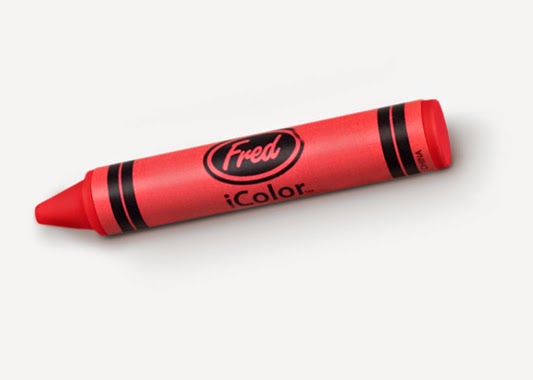
Whenever appropriate, I have my kids use a stylus when using the iPad.  This helps on working on fine motor skills, especially proper grasping skills when using writing instruments.  My two favorites are this crayon stylus by Fred & Friends and this mini stylus pen by Kikkerland.  Both are the perfect size for little hands!

Here are a just a few of my favorite apps and a brief description of what they will work on:

LetterSchool-one of my favorite and definitely my go-to app for handwriting.  Whether you want to begin working on teaching children how to write their letters or if you want to review what they already know, this is the best app out there.  It comes with three options:  uppercase, lowercase and numbers.  There are two levels of play for lots of practice.  For each letter and number, you work through 3 games (tap, trace and write) in order to earn stars.  Once you have completed both the silver and gold levels of play, you can then unlock the opportunity to do free-form writing.
Toonia Differences-I blogged about this awesome app by Toonia a couple of weeks ago here.  This app is similar to those Spot the Differences games you have may have played at some point.  You have two pictures side by side that are almost exactly the same and you have to find the 8 things that are different about the picture.  This is a great app for working on improving visual perceptual skills, especially visual scanning and visual attention.  You can read more about this app here.
Toonia Storymaker-another great app by Toonia.  This one is a fun and educational app that encourages children to be the author of their own story.  They are allowed to choose their own characters and scenes to tell their own story.  They can change colors, shapes, size, posture and emotions while creating their story.  This app encourages creative thinking, sequencing, organization and focus and attention.
Dexteria Jr.-I've had this app on my list of favorites for a long time.  This occupational therapist created app is a set of hand and finger exercises that help develop fine motor skills and work on getting kids reading for handwriting.  It's great for children as young as 2 years old and can be motivating enough for those as old as 8-10.  There are 3 games with multiple levels of play in each game.  Squish the Squash works on pointing skills; I am pretty strict with the kids about using their pointer finger during this game.  Pinch the pepper works on developing in-hand manipulation skills, specifically pinching using the thumb and pointer finger.  The last is game is Trace & Erase and kids work on graphomotor skills by tracing lots of different lines and shapes.  Once they are done tracing, they have to erase the lines and then the built-in camera will take a silly picture of the kids.  It's a simple game that works on visual motor and visual perceptual skills as well as improving focus, attention and concentration.
Pepi Play-it's hard to choose just one of the apps by Pepi Play.  I have all of their apps and they are big favorites with the kids I work with.  They are incredibly interactive and within each app, there are several games for them to play with.  Right now, my kids are really loving Pepi Bath 2 and Pepi Doctor.  Pepi Bath 2 has 6 different bathroom or cleaning situations.  It's the kid's job to help their character (3 to choose from) get all cleaned up:  they may help them go to the bathroom, get cleaned in the bathtub or get their clothes cleaned after some dirty play!  In Pepi Doctor, the kids help their character "get better"; they may need to help them get better from a cold, after falling off their bike or scooter (I ask the kids to tell me what they think happened to the kid and how they got hurt) and getting lots of scrapes and dealing with an aching tooth.  These apps are just two of the several that you and your kids will love playing together!
Tiggly-Tiggly has created two interactive games and several apps that work on fine motor, visual motor/perceptual, eye-hand coordination, early literacy and math skills.  Tiggly Shapes are rubberized shapes (circle, square, triangle and star) that children can use for learning and play with three different Tiggly apps.  The shapes have a soft plastic cover and silicon touch points that interact with the iPad screen.  They are incredibly durable and can withstand crazy toddlers but gentle enough that they are safe for the iPad screen.  Read more about Tiggly Shapes here and find out all therapeutic fun your kid will have with them.  You can read more about TigglyMath in an early blog post here.  Rumor has it that Tiggly will be releasing a third learning system next week....just in time for the summer!  I can't wait to see what they have in store for all of us.  It's sure to be both educational and fun!
Endless Alphabet/Endless Numbers-Originator Kids is another wonderful studio creating fabulous apps for kids.  My two favorite are Endless Alphabet and Endless Numbers.  Endless Alphabet is a fun way for kids to get ready for early reading by being introduced to new words.  Kids have to match the letters of the word and then get to watch a short little video with some really cute monsters once the letters are all placed in the right spot.  Endless Numbers is a really fun way for kids to learn numbers, sequences and quantity.  It is incredibly interactive and fun so the kids don't even realize that there is a tremendous amount of learning going on at the same time.  These are just two of the great apps by Originator.  Be sure to check out all the others, especially the Mr. and Mrs. Potato Head Create and Play apps!

Bugs and Buttons /Bugs and Bubbles/Bugs and Numbers-Little Bit Studios may be one of my favorite app designers for children.  First of all, the games are fun and educational at the same time.  Each app comes with 18 different games which means that your kids can be entertained for a really long time.  The likelihood of them getting bored quickly is pretty slim which leads to lots of learning as the explore all the mini games.  Check out this blog post here that talks about just how amazing Bugs and Buttons (original and Bugs and Buttons 2).  If you want a real bang for your buck, then I highly recommend any and all of the apps by Little Bit Studios!
Avokiddo Apps-I wrote about this amazing company extensively in this post from March 27th.  So far, there are 5 different apps to choose from and they work on a variety of skills ranging from learning the letters of the alphabet to recognizing emotions to problem solving and several executive functioning skills.  The graphics are just amazing, the music is soothing and because of that, the kids I work with are totally motivated to play, explore and learn when using them.  I know when apps are really amazing when the kids I work with constantly ask for them and that is what happens with all of the apps by Avokiddo!

So, these are just a handful of the many apps I would recommend for summer learning.  As I was going through my iPad that is chock full of wonderful apps, I had a hard time choosing which ones to share with you all.  I ended up picking ones that kids are most likely to be independent with....they won't have to ask their grownups for too much help.  I also chose ones that I thought would be good for kids to play together in order to promote important social skills like turn-taking, compromise and conversation skills.

I would love to hear from any of you with some of your favorite apps.  If you have specific questions about apps that would be good for your children or ones that would work on specific goals, I would be more than happy to help you find the perfect ones.  I am always a click away and love helping parents and professionals identity apps that are better than others.  It can be a daunting experience going through the thousands and thousands of apps out there and since I have done so much research, let me be the one to help you as you figure out what would be best for your child.

Wednesday, 10 September 2014

Learning Can Be Fun!


One of the things that my colleagues know about me is that I love using the iPad during my therapy sessions.  I was an early lover of the iPad and what it could bring to a therapy session.  There were many times I felt really bad about my iPad causing a distraction to the other children and therapists around me.  As the years have gone by, many more of my colleagues are joining me and realizing that when used in conjunction with a ton of other therapy approaches, the iPad can be a tremendously motivating and useful.  What I love most about it is that you can combine the iPad with a ton of other occupational therapy goals and kill two birds with one stone.  Have a kid who needs to work on building upper extremity strength and is resistant to those activities?  Place them on the net swing and find a game for them to play; I guarantee you will get them to stay in that challenging position for much longer!  Do you have a child who needs to work on improving handwriting skills or grasping on a writing instrument?  Give them a stylus when doing handwriting apps so they are working on both letter writing and using a proper grip.

Recently, I have been asked to share my favorite iPad apps with my colleagues and the families I work with.  As more people begin to join the tablet world, they want to make sure that they have enough on their iPads to meet the needs of their children.  There are SO many great apps out there and sometimes it's so overwhelming looking through the app store that people get scared away.  While I have shared many of my favorite apps recently, I thought I would share this comprehensive list I created last week.  There are probably a million more apps out there (and please share your gems with me...I am ALWAYS looking for new ones), but I thought I would share my most recent list with you all.    There are a lot here but it's just a sampling of what is on my iPad and what I use during my sessions.

Little Bit Studio happens to have some of the most amazing and motivating apps that I know of.  Not only do the kids that I world with love them, I love to play them with the kids!  They all range in price from $1.00-3.99.  For some, that might seem like a bit of a steep price for an iPad app, but each game comes with about 15 mini games.  

 Bugs and Buttons-18 really fun games that work on a variety of academic skills.  Great game for working on fine motor, visual tracking, visual motor and critical thinking.  
 Bugs and Buttons 2-follow up game to Bugs and Buttons, another 18 games that work on pinching, counting and letter recognition.  
 Bugs and Numbers-another 18 games that make learning math loads of fun for preschool and school-age kids.  Number/shape identification, sequencing, tracking numbers and learning fractions are just a few of the math skills a child can work on when using this app.
 Bug Mazing-created for pre-school and school age children.  Great for working on reinforcing number, letter and shape recognition while working on fine motor and problem solving skills.  

Binary Labs has created a series of apps that are great for preschool and school age children.  What I love about this company is that they recognize the importance of how good fine motor skills can support handwriting and math skills down the line.

Dexteria-the first app I discovered by Binary Labs has been one of the apps I regularly recommend to other therapists and parents.  There are few apps that work on fine motor skills such as grasping, pinching and fine motor control like dexterity and control skills.  Great for older children or even adults who need to work on developing these skills.

Dexteria Jr-hand and finger exercises that develop fine motor skills for kids between the ages of 2 and 6.  The activities are fun and motivating so the kids don't realize they are working on skills!  Squish the Squash works on finger isolation/using your pointer finger while Pinch the Pepper works on developing grasping skills and improving finger strength.

Dexteria Dots-I have been on the hunt for good math games so was thrilled when I heard about this game.  Fun and intuitive game that work son teaching kids the concepts of addition, subtraction and relative size.  There are different levels so this game is good for children between the ages of 2 and 8.

Dextetia Dots 2-this is a great app that works on fine motor, visual motor and visual motor skills while doing math at the same time.  Helps to reinforce math concepts such as greater/less than/equal to from a conceptual standpoint for school age children 5-10 years of age.


Fizzbrain Apps is a mom and pop company that has dedicated themselves to creating a series of apps that will motivate children to learn.  My favorite ones are their series of Touch and Write apps which . In addition to these apps, they have many apps created for children on the autism spectrum.   
Touch and Write-kids can practice writing the letters of the alphabet using 16 different materials; my kids really love practicing writing with shaving cream or jello!  What I love about this handwriting app is that not only can you practice writing individual letters, but they give you the option of personalizing this for each child and making word lists so they can work on spelling at the same time.
Touch and Write Cursive-for older children who need help with learning cursive.  This app is the same as the original and offers you the opportunity to practice upper and lower case letters and full words.  
**with both of these apps, I suggest using a stylus so you can encourage a proper writing grasp.  I also like to have the children write the letters and words on paper after they have practiced on the iPad in order to generalize their skills.  


Highlights Hidden Pictures-just like the classic puzzles found in the Highlights and High Five Magazines, this app has over 50 puzzles to choose from.  You can change the level of difficulty by turning hints on and off.  Great for working on visual skills such as visual perception, visual tracking and visual organizational skills.  My school age children love this app.  Sometimes, I will have them use the iPad first and complete a puzzle and then give them a page in workbook after to work on generalizing the visual skills.


Whac-a-Mole-I was really excited to see that one of my favorite games to use with my kids was also an app.  There are over 50 levels of play with it getting more challenging as you beat them.  The object of the game it to earn as many coins as possible as you tap and swipe the moles out of your way.  This is a great app for older children who need to work on visual motor skills.  In addition to improving visual motor skills, you can work on executive functioning skills such as organization, focus and visual attention.  

MOMA Art Lab-wonderful app that works on improving creativity and art skills.  Intended for children ages 7 and older, this app allows children to explore how artists can use lines, shapes and colors to create artwork inspired by some of the artwork seen at MOMA.  I love to use this with small groups of older children and watch them work together to create a piece of art.
So many of the kids I work with have a difficult time doing a more abstract art project.  They can be successful with activities that have clear rules and expectations, but get frustrated by more open-ended art activities. This can be a great app to show them that they can be successful and expand their imagination.  If you want to take it to the next level, have materials available for them to make a real life project that resembles what they have just practiced on the iPad.


Pinch Peeps-fast paced and fun app that works on improving fine motor, visual motor and visual perceptual skills.  Pinch and drag together similar peeps in order to score as many points as possible.  The faster you go, the more points you get.  I love using this with my older kids who need a fun way to work on improving executive functioning skills such as organization, focus and attention and following directions.  As an added requirement, I have my older kids tell me the rules and steps of this game before they can play the game.


Faces iMake ABC-looking for something fun and different to work on teaching your little ones their letters?  Faces iMake ABC is just for you then!  This is an interactive game that works on letter recognition and learning the sounds of each of the letters.  What I love about this is there is a puzzle for each letter of the alphabet which works on visual skills, such as tracking, eye hand coordination and perceptual skills.  The kids I work with love how they use every day objects like buttons and different foods to turn them into pictures.
If I have a child who is working on learning how to write the letters, I will let them put the puzzle together first and then they have to practice writing the letter after.  For those who need encouragement for handwriting, I find this to be motivating.
There is a second piece to this game that is more appropriate for older children.  For each letter, the child is asked to find the 5 objects in a field of about a dozen pictures that start with the letter.  This works on improving organizational skills, focus and attention.  

Dipdap-do you have a child who has a really time with drawing?  This is a really fun app that can work on improving drawing skills in a unique way.  Dipdap is a cute character and your job is to help him through 16 different adventures by completing pictures.  In each of the 16 pictures, an object is missing that your child has to draw.  For example, Dipdap is in a car but the whole outside is missing.
For kids who shy away from drawing because they have difficulty with it, I find this to be a non-threatening drawing app that they can be successful with.  I like to talk through it with them before they start drawing; for some kids the planning part is more difficult than the actual drawing part.
As I like to do with the handwriting apps I use, immediately after a child draws on the iPad, I like to get them to practice drawing a picture on paper that they can take home and show off to their people.
Don't forget to have a child use a stylus of your choice when doing this drawing app.  I think it's tremendously important for a child to always be encouraged to use a proper grasp when drawing so find the one that your child is most comfortable with and let them draw away!

Letterschool-one of my favorite handwriting apps out there.  The more important thing is that it also happens to be the favorite of my of the kids I work with as well.  Not only will your child work on letter (upper and lowercase) and number recognition, they will also be learning the sounds that go with each letter.  For each letter, there are three different choices....tap (this helps a child learn where each part of the letter starts) and watch the lines get drawn; drag (drag the arrow from the starting point to the end point) and draw on the chalkboard.  Once the letter is complete for each game, the letter comes to life....racecars zoom, flowers bloom and a train moves along the tracks are just a few of the fun things that your child is rewarded with after they have completed the letter.
I love that you can change the mode so if you are doing the Handwriting Without Tears program with a child, you can use this app along with it.  For my kids, they know that when they use Letterschool, they will have to practice writing the letter either on a chalkboard or a piece of paper.


L'Escapadou has created two wonderful handwriting apps...one for print and one for cursive...that my kids love to play with.
Writing Wizard/Cursive Writing Wizard-practice writing all the upper and lowercase letters and numbers while tracing them using animated stickers and sound effects.  Once the tracing is complete, they can interact with the letters.
The game is customizable and you can play around with the settings to make it best for your child.  There are two modes:  free and 5 Stars mode.  In the 5 Star mode, the focus is on learning the letter by tracing it 5 times.  Once it's successfully traced 5 times, the child earns a star that is then displayed on the home screen with all of the letters.
Don't forget to use a stylus when using this app with your kids.  Also, anytime possible, have them practice writing on paper or a chalkboard immediately after completing it on the iPad.  

Pepi Play has a series of apps that are ideal for preschoolers that work on fine motor, visual motor/perceptual and other academic skills.  My own daughter can play these games for hours and they are often the go to apps when my children at work have earned iPad choice!  
Pepi Tree-in this educational game, children get to explore a variety of tree-dwelling animals and learn about some of their habits.  They get to learn about where they live, what they eat and what different animals look like.  There are six separate games in this app and each one works on some kind of occupational therapy goal.  My kids really love feeding the caterpillars different foods and watching them turn into beautiful butterflies.  I like the owl who uses his night vision to find all of the other animals who are also away at night.  Highly motivating app that works on improving visual motor, visual tracking, fine motor, bilateral coordination and focus/attentional skills.

Wallykazam!  Letter and Word Magic-this preschool literacy app is a big hit amongst my preschoolers and younger school age children.  For kids who are struggling with reading, I find that they are more motivated to work on this skill when some of their favorite characters are involved.  The goal of the game is to help Wally and all his friends in a variety of adventures.  There are several games built into this app that work on phonemic awareness, letter recognition and letter-sound associations.  Additionally, your child can learn how to write letters by tracing them in the stars.  It is highly interactive and keeps even the most frustrated early learner motivated and engaged.  For some of my older children, I have them trace the letters using a stylus so we can work on proper grasp on writing instruments.  If you have children who are struggling with handwriting as well, this is a good game to use in conjunction with handwriting activities.  After they have traced the letter in the sky, have them write it on paper or on a chalkboard.

Super Stretch-while I am not one who does yoga personally, I recognize and appreciate the therapeutic benefits of it and have used it often in my sessions.  Not only is it great for working on overall body strength, it also works on motor planning, focus/attentional skills and breath control.  Whether you do it individually or in a small group, I have found that my kids love following Super Stretch on his adventures.  I like that you can pick and choose which poses you want to work on so it can work on individual goals for each child.  I have used this in my social skills group many times and I love how the kids look at each other to figure out how to get themselves in the different poses.  If you have a child who has modulation and focus/attention difficulties, you can use this app in the beginning of your sessions to work on grounding them and getting them ready for their session.

I know this is a lot of information...perhaps too much!  I also know that this is just a small sampling of the amazing apps out there that can be used to motivate and encourage children to learn a variety of skills.  I feel like it is highly important for me to repeat that it's important to use the iPad as an addition to your regular therapy sessions and not let it replace the hands on, multi-sensory experiences you offer in your work environment.  For some of my kids, the iPad is used as a reward for doing all of their other work.  For others, it is used as a side-by-side activity when working on handwriting.

If you have any outstanding apps that you would like to share, please let me know!  I am always excited to learn about new apps out there and use them during my sessions.  I also know that many of my readers would be excited to hear what you have to say as well.  As always, I am just a click away!

Sunday, 10 August 2014

Back to School Already??


Summer is flying by and school supplies are out on the shelves for purchase.  While I am not even remotely thinking about the fall and trying to take in all that summer has to offer, I know that there are some people who want to get their kids thinking about school.  One of the big things parents want to do over the summer is keep their kids busy with fun activities, but also make sure that they don't lose any of the academic skills that they worked on during the school year.  Now that my daughter is getting older, I find myself spending time this summer getting her prepared for pre-k.  She is a typically developing girl but I have discovered that she is very hard on herself about getting things just right and gets frustrated easily and gives up when she isn't able to accomplish that.  I have found that working on things like handwriting needs to be done in a way that is fun and meaningful to her.  And this is not just for her but for all kids, especially those who may struggle with learning in the most traditional way.

If you read my blog consistently, you already know how much I love the iPad in motivating children to learn.  It is not the only thing I use and will often use it with an activity that is related to what the app is working on.  For example, if I am using an app that is working on learning shapes, I will use a puzzle, shape sorter or shaped beads as a related activity so they can do something hands on and sensory based to help generalize the skill.

Whenever possible,  I use a stylus when kids are engaged in apps so they can work on improving their pencil grip at the same time.  Find one that your child feels most comfortable with and try and make it a rule that if they want to use the iPad, they have to use the stylus.  My favorite is the iCreate Crayon stylus by Fred & Friends as it is just the right size for those little hands.  In addition, children have to work on using the proper amount of pressure when using the stylus; if they press to hard, it won't work as well for them.

The app store is a magical place with new and amazing apps being added daily.  It's hard to keep up with what is out there and even more difficult to really know which ones are worth the money and the space on your iPad.  For those of you (parents and therapists alike) who are looking for some new apps that will keep your kids motivated while also working on preparing them for the upcoming school year, I will share with you what has been hot with my kids this summer and what you can use to get your kiddos geared up for the upcoming school year.

Curious About Shapes and Colors:
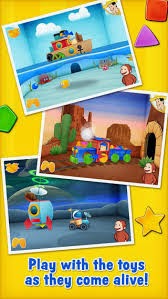
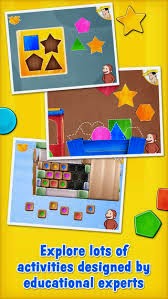
Looking for a fun app to motivate your preschoolers to learn their shapes and colors?  Curious George and the Man with the Yellow Hat lead you through five different levels of matching and sorting fun to help build a toy. Within each level, you will find 5 or 6 activities.  After you have completed all of the activities in each level, there is a game for you to play with whatever you have built....a robot, a boat, a train, a dinosaur, a castle or a spaceship.

While this game is most appropriate for the younger preschool set, I have found that my 4 and 5 year olds attention can be held as well.  The nice thing about this app is that there is no reading involved and that the directions are all spoken to the children so they can be somewhat independent (a child should always be supervised when they are using the iPad but it's also important for children to become more independent when engaged in educational apps).

Skills that can be worked on using this app are:
*Improving matching and sorting skills
*Working on introducing colors and shapes to younger children
*Begin introducing concepts such as same/different and spatial concepts such as in, around, below, etc..
*Improving attention span and frustration tolerance

Other early learning apps worth exploring:
*Monkey Preschool Fix-It by Thup
*Tiggly Safari by Tiggly
*Endless Alphabet by Originator Kids


Writing Wizard:
I am always on the lookout for the perfect handwriting app.  I have found that nothing motivates a child to learn how to write more than using the iPad.  As I have already mentioned, I NEVER use just the iPad to teach a skill but will use it in order to get a child motivated to try something that consistently causes them frustration.  It is a great tool to use to show a child struggling with handwriting that they can be successful; not only will it be fun, it will be educational and can give them the motivation to try handwriting with less argument.

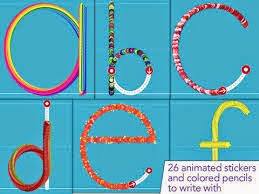
There are a lot of writing apps out there but I am a particular fan of Writing Wizard by L'Escapadou.  There is also a cursive version of this app which I have used with the older kids on my caseload who are struggling with learning how to write in cursive.  Writing Wizard allows a child to practice upper and lowercase letters, different shapes and pictures and numbers.  There are two different modes:  Free Play Mode and Star Mode.  With Free mode, you can practice 1 letter (shape or number) at a time and move onto the next one.  With Star mode (you can set it to 1-5 stars), you practice the same thing over and over again with it getting more challenging each time.  For example, the first time you practice, you just trace the letter.  Eventually the letter will become smaller and the lines will even disappear and a child then has to draw it by memory.  What makes this different from other apps, is that there are 26 animated stickers and "pencils" to draw with and interact with after you are done writing.  My kids especially love watching the flying objects fly back into place to make whatever they just practiced.  

Be sure to practice writing each letter with a writing instrument and paper after you use this app in order to generalize the skill.  In my opinion, it doesn't matter if a child knows how to write the letter on the iPad if they can't do it on paper as well.  A child does not "master" writing letters for me until they are able to write letters in both the iPad and paper.  I tend to find that my children are more motivated to write their letters if it is done in a fun way so I ask parents to send in stickers with their favorite characters, sports teams, etc. so we can practice writing the names out.  Kids will run out of our sessions with their page full of stickers and their names written out and a huge smile on their face.  

Skills that can be worked on while using this app are:
*Improving shape, letter and number recognition
*Improve tracing skills
*Improve grasping skills (use a stylus when using this app to encourage a proper grasp)
*Improve letter and number writing skills

Other handwriting apps worth exploring:
*LetterSchool
*Touch and Write (shapes, letters, cursive) by Fizzbrain


Highlights Hidden Pictures:
One of my favorite childhood memories was when my issue of Highlights came in the mail.  There were so many great activities to do in the magazine (and I am happy to say that we get this magazine now for my daughter and it is still wonderful) but nothing compared to the excitement I felt after finishing a Hidden Pictures page.


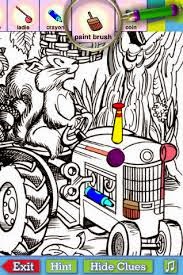
I have been keeping my eyes open for a Hidden Pictures app for ages but it wasn't until recently that Highlights came out with one that resembles the magazine version.  This is a great app for my older children who have visual motor difficulties.   One of the nice things about this app is that you can grade it for children who may need more help by using the "clue" option.  I tend to see if my kids can do it without the clues before turning that on.  For my children who need to work on handwriting, I have them work on practicing while finding the pictures.  After they find each hidden item, they then have to write the name of the object that they have found. With over 50 different pictures, it's difficult for kids to get bored with this app.

Skills that can be worked on using this app are:
*Improving visual perceptual skills, including visual spatial skills and visual organization skills
*Improving handwriting skills by writing out the objects you find after you find them
*Improve attention span, frustration tolerance and many other executive functioning skills

Other visual perceptual apps worth exploring:
*Bug Mazing by Little Bit Studios
*Pick-Up Sticks
*Jigsaw Box


Bug Art:
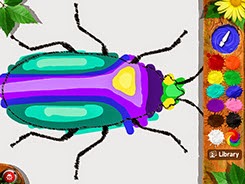
It's no secret how much I love all the apps by Little Bit Studios.  My kids NEVER tire of them and any time a new one comes out, I have to get it.  Bug Art is their newest app and works on inspiring imagination, creativity and play in children.  Children can paint, design and explore the app in a fun and easy way.  They are encouraged to paint whatever comes to their minds (some kids may need a little help from their grownups to think about what they want to make and how to go about that).  Some may be able to draw independently and others may need the interactive tracing...whichever allows for your child to be successful!  Once they create a bug all of their own, they can then play one of the several games built into the app.  For example, they can take their bug and have them participate in fast and furious bug racing.  For those children who might not be ready for that, they can test out having their bugs fly through different environments.

Skills that can be worked on using this app are:
*Improving visual motor and visual perceptual skills
*Improve grasping skills (be sure to use a stylus whenever possible)
*Improve attention span and frustration tolerance
*Improve creative skills

Other drawing apps worth exploring:
Doodlecast by Sago Sago
Draw Along with Stella and Sam by Zinc Roe Designs
DipDap

These are just a handful of the many apps that have been played by the children I see all summer.  As we head into the final weeks of summer and parents are asking you how to get their children back into the whole school mode, you can suggest some of the apps listed above.

Do you have any apps not mentioned here that you have loved working on with the kids that you work with?  I am always looking to freshen up my iPad and keep my kids motivated by changing out apps often.  Like the toys that I have in my closet, it's important to rotate the apps that you present to the kids to make sure they are constantly learning.  If you have any great apps to share with all of us, please let us know!  As always, I am just a click away and love hearing from people.  Not only do I appreciate you taking the time to read, I appreciate the suggestions I have received from you all.

Enjoy your final weeks of summer.  I hope that you are spending them creating memories with your loved ones!

Friday, 28 March 2014

Free App Friday...Who Knew?


This will be a short post, but one that I think many will appreciate.  Not sure how I hadn't heart of it before, but there is a great website,  that offers a Free App Friday blog. Smart Apps For Kids is a website dedicated to helping people find the best apps out there.  They will help guide you by age, subject and skill you are interested in working on.  today's list.  While many of them are not ones that I am familiar with, I was excited to see some really good ones on there that are already on my iPad and enjoyed by many of the little ones I work with.

For example, Drawnimal by YAYATOY is on there.  This is a great app that can work on not only introducing children to the letters of the alphabet but encourage drawing skills.  Many of the kids I work with have a desire to learn how to draw and I have struggled with the best way to teach them.  I have this on both my iPad and my iPhone.  I have had better success with it using my iPhone but am looking for the writing surface to use in order to use the iPad as I think it is more interactive and exciting for my younger children.

Another one on today's list is Shiny Bakery.  My daughter loves Shiny Party and the characters in this game are the same.  Alice the Zebra has opened her own bakery and she needs your child's help.  A child has to follow the recipe and then help her bake cookies or cakes and then decorate them.  This app is great for working on developing a sense of numbers, expanding a child's creative juices and improving problem solving skills.

There is an app I have been very excited about that is also mentioned on today's list but is not a free one.  However, I think that the $.99 will be well worth it for Bug Art by one of my favorite app creators out there, Little Bit Studios.  While I have not had a chance to use Bug Art, I continue to use Bugs and Buttons 1 and 2, Bugs and Bubbles and Bugs and Numbers on a daily basis with my kids at work and my own daughter loves them as well.  Bug Art is described as an app that allows your child to free paint whatever they want to create.  They can learn to draw with interactive tracing or design their own bugs.  Using their bug creation, they will then be able to play, explore and challenge themselves in a different games and environments.  Their are 13 other bugs included in the game that your bug can compete against in mini games.  Like I said, I haven't played this game but am sure it won't disappoint.

For those of you who are constantly on the lookout for new and exciting apps, keep the Free App Friday list by Smart Apps For Kids on your radar.  I know that I will be checking in every Friday to see what apps I can find.  I love a bargain and there are lots on here.  Do you have any other app lists that you subscribe to and can recommend to all of us?  Please share if you do.  I am always a click away and love hearing from you all!

Thursday, 13 March 2014

What's On Your Pad?

While I know there is still a lot of controversy about using handheld devices/tablets with children, I happen to be one of those therapists that has found an incredible amount of success using the iPad in my private practice.  It is by no means my sole means of therapy but when used in conjunction with other modes of therapy, it can be a very motivating and meaningful tool.  I use the iPad with children of all abilities and ages and always combine it with another occupational therapy goal.  For example, for my children who need to work on increasing upper extremity strength, I will have them play with the iPad while lying on their belly while in a barrel or on the net swing.  Typically, I can get them to remain in these challenging positions for much longer when distracted by a fun app.  Another common skill I address is grasping skills.  For almost all the games that I use in therapy, I try and have the child use a stylus.  Even though I know the iPad is all about the touch screen, I find that if I am going to use it with the kids I work with, I want them to practice holding a writing instrument.  As I have mentioned in several of my posts, I prefer to use the iCreate Crayon Stylus by Fred & Friends.  It is the perfect size for little hands and a fun and distracting way to work on improving a child's grasp on a writing instrument.  It can be found in many local toy stores (I got mine at West Side Kids on the UWS of Manhattan) and on Amazon.com.

I wanted to share some of the top apps that are being played both at home and in therapy these days.  When I purchase an app, I am never sure of how good it is until it has been kid tested and approved.  Here are four of the top hits on my iPad these days by the kids in my life (personal and professional) these days.


Sago Mini Pet Cafe
This app is perfect for toddlers and preschoolers and I have found great success with some of my children with significant language and cognitive delays.  There are three engaging games within the app that helps children learn about colors, shapes and numbers.   There is a matching game that requires a child to drag a piece of food into the right shadow.  My favorite, and the favorite of many of my kids, is the counting and sorting game that requires you to drag 10 pieces of food onto a platter.  Once they are on the platter, you have to feed the correct animal based on the color of the food.


Some of the occupational therapy skills that can be worked on are:
*visual tracking/eye-hand coordination skills-great way to practice these skills is when placing the food on the platter.  Don't just let the kids swipe the food onto the plate; instead, encourage
*color recogntion-make a super colorful drink for your animal to drink; have the child choose the color that you ask them or have them identify the color as they are putting it in the cup
*sequence/patterns-when making the colorful drink, you can up the challenge for certain children by having them follow a color sequence/pattern.  I have used a visual prompt for my kids to refer to so they don't need verbal prompts from me and can be more independent.
*grasping skills-if you are trying to work on improving grasping skills, be sure to use a stylus when playing this game.  Make sure that you tell the child to not push too hard when using the stylus so their hands don't tire (it can be difficult for the kids I work with to use an appropriate amount of pressure on writing instruments.  When using the stylus that I talked about earlier, if you push too hard, it is actually harder to use it.  When they use just a little bit of pressure (like they should when using crayons, markers and pencils) they have greater success.)

Toca Boca Pet Doctor
It's difficult for me to find an app by Toca Boca that I don't love.  My iPad speaks for itself and you will see that I have almost every single one and they are used quite often depending on the interests of certain children.  A couple of days ago, my husband told me I had to look into Toca Boca Pet Doctor.  It has become a fast favorite for my daughter who just turned 4 this week.  All Toca Boca apps are highly engaging for kids of all ages.

While they claim that Toca Boca Pet Doctor is good for children ages 2-6, I would say it is more appropriate and entertaining for the toddler and preschoolers.  The point of the game is to help the 15 different ailing animals.  Each one has something uniquely wrong with it and you have to help them so they can eat a snack and then go to sleep.  My daughter's favorite is the helping remove all the fleas from the dog and then getting to feed him dog treats.

Some of the occupational therapy goals that can be be focused on when using this app are:
*eye-hand coordination skills/visual motor skills-many of the games require good visual motor skills.  For example, you have to pull the hopping fleas off the dog and put them into a jar.  You have to be careful and watch where the fleas go (and they can move pretty fast) so you can grab them and place them in the jar.
*visual perceptual skills-if you want to work on this skill, be sure to choose the bunny.  Somehow the poor bunny got hurt and has booboos all over his face and needs someone to put bandaids on him.  There are four different shaped bandaids and booboos and you have to match them up.
*problem solving skills-for some of the animals, you have to figure out how to move them around in order to feed them.  For example, the turtle is lying on his back and can't eat so you have to figure out how to flip him over in order for him to eat.  It not only takes problem solving, but requires you to be patient and not get frustrated.
*grasping skills-as I have said a million times, you can always work on improving grasping skills when using almost any app.  Use the iCreate Crayon Stylus to encourage a proper grasp on writing instruments.


Writing Wizard
Many of the older children I work with come to me because they need to work on improving their handwriting or drawing skills.  They are often resistant to working on handwriting the traditional way (with paper and pencil) and require a tremendous amount of encouragement.  I have found that by using the iPad in conjunction with paper/pencils, kids are more motivated and willing to work on this challenging task.  A few months ago, a colleague of mine recommended Writing Wizard by L'Escapadou and since she did, it's been my go to handwriting app.  I always use the iCreate Crayon Stylus when using this app in order to work on improving pencil grasping skills at the same time.


Writing Wizard is a handwriting app that offers a lot of fun and keeps kids motivated to keep learning.  They can trace letters, numbers and shapes/pictures using a variety of animated stickers and sound effects.  Once the child has completed tracing, they can then interact with it which gets them excited about doing it the correct way.  There are two different modes of play (free mode and 5-star mode); I tend to use the 5-Star mode because I like that the challenge increases on each star so by the end, your child has to write the letter without tracing but by actually remembering how to write the letter.

I love that you can also create a list of words for children to practice.  For some of the kids I work with, I am asked to work on practicing spelling words and this could be a fun and engaging way to keep them interested.  I would not just let them write them on the iPad; once they write it on the iPad, I would have them write it with a pencil on paper to work on generalizing the skill and further practicing their words.  

I have several writing apps on my iPad but this is my go to one right now.  Some of the occupational therapy skills that can be worked on are:

*letter recognition-you can use this app for the very basic skill of learning, recognizing and identifying letters and numbers and shapes.
*grasping skills-if you are trying to work on improving grasping skills, be sure to use a stylus when playing this game.  Make sure that you tell the child to not push too hard when using the stylus so their hands don't tire (it can be difficult for the kids I work with to use an appropriate amount of pressure on writing instruments.  When using the stylus that I talked about earlier, if you push too hard, it is actually harder to use it.  When they use just a little bit of pressure (like they should when using crayons, markers and pencils) they have greater success.)
*eye-hand coordination/visual motor skills-as with most handwriting apps, this requires you to use good eye-hand coordination when tracing the letters, numbers or shapes.
*focus and attention skills-when using the 5 star mode, it will require a child to focus and attend to a specific letter, shape or word through five turns.  The difficulty increases for each turn and by the final star, a child is required to write the letter without tracing the lines.

Bugs and Numbers
I am a huge fan of Little Bit Studio and their awesome apps.  I have already blogged about Bugs and Buttons and Bugs and Bubbles and continue to use them all the time in therapy.  Bugs and Numbers is equally as awesome as the other Little Bit Studio apps.  It's a great app for beginning to work on math skills, including number recognition, fractions and patterns.  It's perfect for preschoolers and younger school age children.  As with all the other Little Bit Studio apps, there are 18 different games within the app so there is little chance that you can't find something that is appropriate for almost any child.


Some of my favorite games in the app are:
Color By Number-great for working on learning numbers in a fun way.  Children have to color in different parts of the picture based on the number.  
*don't forget to use the  iCreate Crayon Stylus for this game in order to encourage a proper writing grasp


Hotel Matching Shapes-great for working on improving visual tracking and visual perceptual skills.  The level of difficulty increases as they complete each level making it more of a challenge for some of your older preschoolers/early school age children.  You start off by matching numbers and shapes and can move up to having to match/put together different pictures (robots and bugs).  
Left Right-I find it can be quite difficult to teach a child with body awareness difficulties right vs. left.  This game requires that you take a bug through a path without hitting obstacles that might be in his way.  Using left and right arrows, you avoid hitting soda cans and other objects.  I like to ask my kids to show me their left and right hands before we begin in order to organize them for the activity.  
Garden Patterns-children need to get a bug through a maze to a cookie by following a pattern provided.  It starts off with a two shape pattern and then continues to get more difficult.  Great for working on visual perceptual skills and organizational skills.

Each of the apps describe above can also be worked on with friends in order to encourage social skills.  I am a big fan of working on improving social skills at any chance I can.  With all of these apps, you can work on taking turns, being flexible with a choice a friend might make or doing things differently than you might.  These are skills that are hard to teach sometimes and need to be taught in the moment based on what happens when they play together.  Some of the best learning moments in regards to social skills happens when we are least expecting it.

Additionally, all of the apps can work on improving language skills.  If you are working with a child who also receives speech and language therapy, be sure to check in with their therapist and find out how you can support the work they are doing.  I happen to be super lucky and work with a handful of speech therapists who often ask me what they can do to support my work.  I promise you that the speed at which a child acquires and generalizes skills is faster when you work as a team.  

Now that I have shared some of my favorites with you, I would love to hear from all of you about your top apps these days.  So many of the apps that I download are done so because I have read great things about them or they have been suggested by other people.  With the thousands of apps out there to choose from, it is often difficult to pick out which ones are worth the money and space on my pretty full iPad.  If you have a great app that you find works wonders with your kids, please share them with me and my readers.  If you have any questions about the apps that I have suggested, please don't hesitate reaching out to me.  I am always a click away and love hearing from you all.